Aegis Security
Security plugin for WordPress
Recover from malware without breaking your site
Aegis Security scans your files, database, administrator accounts and scheduled tasks, then guides you through a cleanup in which every change is previewed, backed up, verified and ready to roll back.
- Version
- 1.0.0
- WordPress
- 6.0 or later
- PHP
- 8.1 or later
Overview
Malware recovery, firewall and 2FA, with every fix reversible
Aegis Security is an application-level security plugin for WordPress. It scans files, the database, administrator accounts and scheduled tasks for malware and backdoors, then guides you through a recovery in which every change is previewed, backed up, verified and reversible. Alongside the scanner it runs a web application firewall inside WordPress, protects the login with attempt limiting and TOTP two-factor authentication, applies hardening fixes that it tests over HTTP, and keeps a timeline of file changes.
It is made for site owners, administrators and agencies who need to recover from an infection without breaking the site, and who want ongoing protection with honest reporting. The defaults are cautious: the firewall starts in Learning mode, nothing is deleted permanently unless you type DELETE, and wp-config.php is never edited automatically. For the moments when you are locked out, a safe mode constant, a lockdown override and WP-CLI recovery commands are documented and ready to use.
Cleanup you can undo
Every file change is previewed as a diff and backed up first. Cleaned PHP must pass a syntax check, and a broken front page triggers automatic rollback.
A firewall that learns first
New installs start in Learning mode, logging what would have been blocked so you can add one-click exceptions before switching to Enforce.
Hardening that is actually tested
Of 20 hardening checks, 14 apply in one click and 9 are verified over HTTP, for example by testing whether your server executes PHP in uploads.
Features
Everything inside Aegis Security
A complete list of what the plugin does, grouped the way you will use it.
Malware scanner
A layered, resumable scanner that weighs several kinds of evidence before it reports a file.
Four scan types. Quick checks changed files, admin accounts and scheduled tasks; Full adds official checksums, all files and the database; Integrity and Database scans focus on one area each.
Chunked, resumable engine. Each request does a bounded slice of work and saves its position, so scans survive PHP timeouts and can run from the browser, WP-Cron or WP-CLI.
Layered detection. Location and extension checks, 27 malware signatures, PHP token analysis, obfuscation heuristics and SEO spam heuristics combine into a confidence score for each finding.
Sensitivity setting. Low, medium or high sensitivity sets the confidence a file needs before it is reported.
Broad file coverage. Checks PHP, JavaScript, HTML, .htaccess, ini files, images that may hide PHP and extension-less files, never follows symlinks, and skips .git, .svn and node_modules.
Shared hosting controls. Low-resource mode, configurable seconds per slice, a maximum file size and path or wildcard exclusions keep scans gentle on modest servers.
Database, accounts and scheduled tasks
Infections rarely live in files alone, so Aegis also inspects the places attackers use to persist.
Database scan. Walks posts, postmeta, options, comments and user URLs for injected scripts, scripts from high-abuse domains, PHP code, hidden link blocks, encoded payloads and spam.
Configuration checks. Flags a mismatch between the home and siteurl hosts, and active-plugin entries that point to missing or unusual files.
Hidden and suspicious administrators. Finds administrators concealed from the Users list, attacker-style usernames, disposable or missing admin e-mail addresses, and new or unreviewed admin accounts.
Suspicious scheduled tasks. Finds WP-Cron tasks with code-like or URL arguments, callbacks living in uploads, hidden or temporary files and random-looking hook names.
Cleanup, quarantine and recovery
A guided recovery path in which each action is previewed, backed up and reversible.
Per-finding actions. Clean automatically, restore an original core file, restore from a trusted WordPress.org package, disable a plugin, quarantine, ignore, or for accounts and tasks, trust, demote, revoke sessions or disable.
Preview, backup and syntax check. A dry-run line diff comes before any file change, a backup is stored in a protected vault, and cleaned PHP must pass a syntax check or the original is restored.
Post-change site check. Aegis loads your front page before and after risky changes and rolls back automatically if the site stops responding correctly.
Quarantine vault. Stores compressed, non-executable copies in a private folder, above the web root where possible, which can be restored and are only purged after you type DELETE.
Action history and investigation. Every action can be rolled back in one click, and an Investigation report sets out the infection window, persistence, related accounts and an after-cleanup checklist.
Careful database cleanup. Edits plain text columns only, removing verified injected script and iframe blocks with a backup, while serialised and JSON values are reported but never rewritten.
Web application firewall
A firewall that runs inside WordPress, starts by observing, and lets you tune it from the activity it records.
Learning and Enforce modes. Learning mode, the default, logs requests that would be blocked, and Enforce mode returns HTTP 403 with a reference number.
27 versioned rules. Cover SQL injection, XSS, remote code execution, Log4Shell-style JNDI, Shellshock, directory traversal, remote file inclusion, dangerous uploads, XXE, XML-RPC multicall and probes for backups, .env and .git files.
Virtual patches. Two virtual patches, for WP File Manager CVE-2020-25213 and Duplicator CVE-2020-11738, switch on only while a vulnerable version is installed.
Evasion-resistant inspection. Normalises input through repeated URL and HTML-entity decoding, null bytes and SQL comments, and rejects uploaded images that contain PHP.
IP bans and country blocking. Automatic bans after repeated blocks, 404 floods and XML-RPC rate limits, manual 24-hour or permanent bans, IP and CIDR lists, and country blocking via Cloudflare or server GeoIP data.
Per-rule control. Switch individual rules on or off, add one-click Allow this exceptions from the activity list, and confirm search-engine crawlers with reverse and forward DNS.
Login protection and two-factor authentication
Stronger sign-in for every account, with secrets encrypted at rest.
Login attempt limits. By default, 5 failures in 15 minutes trigger a 30-minute lockout that doubles on repeats, and three lockouts in a day become an IP ban.
TOTP two-factor authentication. Works with any authenticator app through a setup key or tap-to-open link, and issues ten single-use recovery codes.
Hardened 2FA challenge. Each challenge is bound to the user, IP and a one-time key with limits on wrong codes, and XML-RPC password logins are refused for 2FA users.
Enumeration blocking. Generic login errors and blocking of author queries, the public REST users list and the users sitemap keep account names private.
Strong password policy. Enforces a minimum length, a common-password list, no username or e-mail name, and either a character mix or a passphrase of 20 or more characters.
New administrator guard. Alerts on, or blocks and reverts, admin rights granted outside a logged-in admin session, and alerts when an admin signs in from a new IP.
Lockdown and session control
Immediate controls for the moment you suspect someone else has access.
Emergency lockdown. Restricts wp-admin, wp-login and admin REST access to listed IPs or CIDR ranges, and always adds your current IP when enabled from the dashboard.
Log out all users. Ends every session on the site while keeping you signed in.
Administrator overview. Shows each administrator's 2FA status and session count, and lets you reset 2FA for other administrators.
Hardening with verification
Hardening that is tested after it is applied, with a clear note on what each change could affect.
20 checks in five groups. Covers WordPress, headers, access, files and server configuration, with 14 items applied in one click and 6 manual items with exact instructions.
One-click fixes. Includes disabling the file editor and XML-RPC, security headers, HSTS, blocking PHP in uploads and sensitive files, wp-config.php permissions and moving exposed debug logs or backups.
Real verification over HTTP. Nine items are checked over HTTP, for example by writing a harmless probe file in uploads and testing whether the server executes it.
Reversible by design. Every applied item shows its risk and can be rolled back, .htaccess changes are written atomically between Aegis markers, and wp-config.php is never edited.
Rules for Nginx and OpenLiteSpeed. Where .htaccess does not apply, Aegis shows the equivalent server rule to copy.
File integrity monitoring
A trusted baseline and a clear timeline of what changed, when and how risky it looks.
Official checksums. WordPress core files and WordPress.org plugins are compared with official checksums, and unknown PHP files in wp-admin or wp-includes are flagged.
Trusted baseline. The first completed scan builds a baseline, and later scans record new, modified and deleted files and permission changes.
Change timeline. Shows detection time, change type, risk, path, old and new hash, modified time and whether a change matches an official package or an update.
Dashboard, logs and notifications
Honest reporting that shows how each score is reached and alerts the right people.
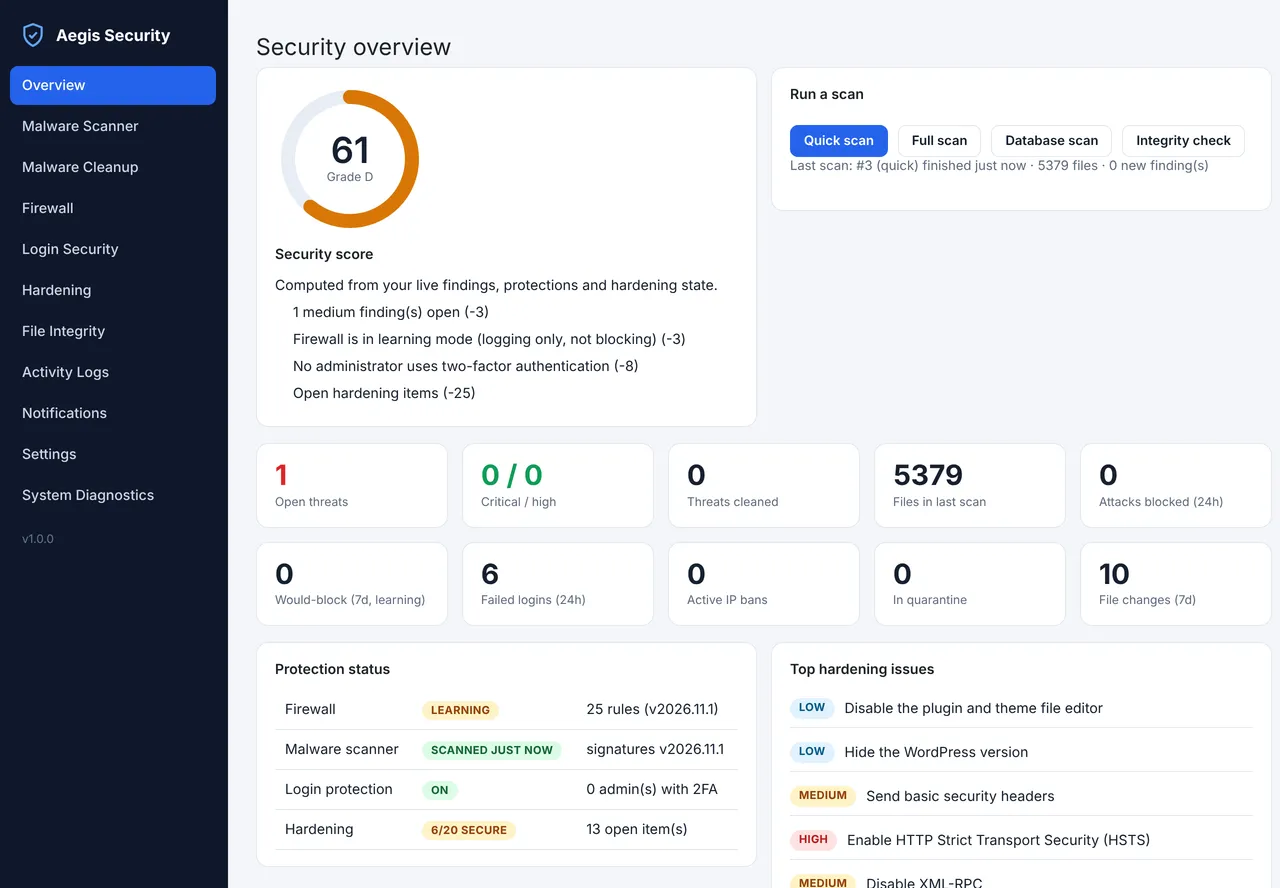
Security score. A 0 to 100 score with an A to F grade lists every deduction, alongside counters, a 14-day attack trend and recent events.
Activity log. Filter events by type and minimum severity, with retention configurable and set to 90 days by default.
Notifications. E-mail, Slack, Telegram and Discord alerts, each with its own minimum severity, a test button and a de-duplication window, with webhook secrets stored encrypted.
Self-protection. Only administrators can deactivate or delete Aegis, deactivation is logged, and the plugin can verify its own files against its checksums.
Safety and recovery
Built so you can always get back
How Aegis Security protects your site while it works, and what to do if you ever need to switch it off.
Safe mode constant
Add define( 'AEGIS_SAFE_MODE', true ); to wp-config.php and Aegis boots nothing, suspending the firewall, login protection, 2FA, hardening runtime rules and its admin interface, and shows a warning instead.
Lockdown override
Add define( 'AEGIS_DISABLE_LOCKDOWN', true ); to wp-config.php, or run wp aegis lockdown off, to lift an emergency lockdown.
Server-side account recovery
Run wp aegis reset-2fa <user> to remove 2FA for a user by login, e-mail or ID, and wp aegis ip unban <ip> to remove an IP ban.
Undo any remediation
Reverse a cleanup with wp aegis rollback <action_id>, restore a quarantined file with wp aegis quarantine restore <id>, or use Roll back in the action history.
Anti self-lockout
You cannot ban your own IP or save a block list containing it, server and allow-listed IPs are never banned, and you cannot demote yourself or the only visible administrator.
Plugin integrity check
Run wp aegis verify-self to check the plugin's own files against its shipped checksums.
Data kept on uninstall
Quarantined files, backups and the audit trail stay in place unless you tick Delete all Aegis data when the plugin is deleted in Settings.
Screenshots
Aegis Security, screen by screen
Real screens from the plugin running on a WordPress site. Select a screen to read about it, or click the image to view it full size.
Pricing
Choose your Aegis Security licence
Secure payment through Razorpay. Your licence key and download link are emailed as soon as the payment is confirmed.
Single Site
For one live website you own or manage.
₹16,999
Price in Indian rupees
- Licence for one website
- Licence key and download by email
- Plugin updates for your licence
- Help by email
Unlimited Sites
For agencies and owners of several websites.
₹32,999
Price in Indian rupees
- Licence for every website you run
- Licence key and download by email
- Plugin updates for your licence
- Help by email
- Ideal for agencies and client sites
Compatibility
Requirements and integrations
- WordPress
- 6.0 or later
- Tested up to
- WordPress 7.1
- PHP
- 8.1 or later
- Also needs
- PHP extensions sodium, mbstring, json, tokenizer, hash and zlib, with curl, zip and openssl recommended
- JavaScript in the browser and a working WordPress REST API for the admin interface
- WP-Cron, or a system cron, for scheduled scans
- Loopback HTTP requests for hardening verification and post-cleanup site checks
- Outbound HTTPS to WordPress.org for official checksums and trusted file restores
Works with
- Apache, LiteSpeed and OpenLiteSpeed: .htaccess-based hardening is applied directly.
- Nginx: the scanner, firewall, login protection and 2FA run in PHP, and Aegis shows the server rules to add for .htaccess-based items.
- Cloudflare and load balancers: set a trusted proxy so visitors are identified by their real IP address.
- Multisite: network activation installs per site, and Aegis screens require a super admin because file operations affect the whole install.
- Page builders: serialised and JSON content from Elementor, widgets and theme mods is scanned read-only and never rewritten.
- XML-RPC and application passwords: 2FA users cannot use XML-RPC with their normal password, and application passwords keep working unless you disable them.
- Checksums cover WordPress core and WordPress.org plugins; premium plugins and themes are still scanned and report their integrity as unknown.
Good to know
- Does not stop network-level or volumetric DDoS attacks, and does not replace server hardening, updates or backups.
- Does not create full-site backups; backups cover only the file or database record a cleanup touches.
- Does not yet include vulnerability intelligence, blacklist or reputation monitoring, or an agency multi-site dashboard.
- Does not fix the underlying plugin with its virtual patches, so updating the affected plugin is still required.
- Does not restore themes or premium plugins from a trusted package, and automatic cleaning removes only recognised, self-contained injected blocks.
- Does not force two-factor authentication at login; 2FA is set up per user.
Changelog
What has changed
Current version: 1.0.0.
Version 1.0.0
- First release.
Documentation
Getting started with Aegis Security
Installation
- 1Check the requirements: WordPress 6.0 or later and PHP 8.1 or later with the sodium, mbstring, json, tokenizer, hash and zlib extensions.
- 2Upload the aegis-security folder to wp-content/plugins, or upload the zip through Plugins, Add New, and activate it. On multisite, network-activate it as a super admin.
- 3Open Aegis Security in the admin menu, visit System Diagnostics and fix any failing items such as the private folder, tables, loopback requests or WP-Cron.
- 4If the site sits behind Cloudflare or a load balancer, set Firewall, Trusted proxy first and confirm that the detected client IP in Diagnostics is your real IP.
First-time setup
- 1Run a Quick scan from the Overview, or wp aegis scan --type=full for a complete first pass. This also creates the file integrity baseline.
- 2Review findings in Malware Cleanup: open each one, preview the action, apply it, then run the Verification step. Use the Investigation report and after-cleanup checklist if the site was compromised.
- 3Leave the firewall in Learning mode for a few days, review the recent activity, add exceptions with Allow this, then switch the mode to Enforce.
- 4In Login Security, click Set up authenticator, save the ten recovery codes, and repeat for every administrator. Review the login protection settings and the New administrator guard.
- 5In Hardening, apply the low-risk items, read the compatibility note on medium and high-risk items before applying them, and click Verify. Follow the manual instructions for wp-config.php items.
- 6In Notifications, enter your e-mail, Slack, Telegram or Discord details, save, then send a test.
- 7In Settings, confirm the scan schedules (Quick daily, Full weekly and Integrity daily by default), add exclusions for cache or backup folders, and choose the log retention period.
Recovery options
- 1Record the recovery options somewhere outside the site before you need them.
- 2To suspend all enforcement, add define( 'AEGIS_SAFE_MODE', true ); to wp-config.php.
- 3To lift an emergency lockdown, add define( 'AEGIS_DISABLE_LOCKDOWN', true ); to wp-config.php or run wp aegis lockdown off.
- 4When turning lockdown on from WP-CLI, always pass --ips, because the command does not add your IP automatically.
- 5To remove 2FA for a user, run wp aegis reset-2fa followed by their login, e-mail or ID.
WP-CLI commands
wp aegis status
wp aegis scan [--type=quick|full|integrity|database] [--budget=<seconds>]
wp aegis findings [--status=open|resolved|quarantined|cleaned|ignored|all] [--format=<format>]
wp aegis fix <id> --action=<action> [--dry-run]
wp aegis rollback <action_id>
wp aegis quarantine list
wp aegis quarantine restore <id>
wp aegis harden list|apply|rollback|verify [<id>]
wp aegis lockdown on|off [--ips=<comma-separated>]
wp aegis ip ban|unban <ip>
wp aegis reset-2fa <user>
wp aegis verify-self
FAQ
Questions about Aegis Security
Something else on your mind? Write to us before you buy.
Will the firewall block my visitors or customers on day one?
No. New installs start in Learning mode, which only logs what would have been blocked. Review the log, click Allow this for anything legitimate, then switch to Enforce.
What happens if a cleanup breaks my site?
Every file change is backed up first and previewed as a diff. After the change Aegis loads your front page, and if it now errors, the change is undone automatically. Any action can also be rolled back later from the action history or with wp aegis rollback.
Does Aegis delete infected files?
No. Quarantine moves files into a compressed, non-executable vault and can restore them. Permanent deletion only happens when you choose Delete permanently and type DELETE.
I locked myself out. How do I get back in?
Add define( 'AEGIS_SAFE_MODE', true ); to wp-config.php to suspend all enforcement, or define( 'AEGIS_DISABLE_LOCKDOWN', true ); to lift lockdown. With server access you can also run wp aegis lockdown off, wp aegis ip unban or wp aegis reset-2fa.
Does it work on Nginx?
Yes. The scanner, firewall, login protection and 2FA run in PHP. For the .htaccess-based hardening items, Aegis detects Nginx and shows the server rule to add.
Can it verify premium plugins and themes?
Only WordPress core and WordPress.org plugins have official checksums. Other files are still scanned for malware, but their integrity status shows as unknown.
What do I lose if I delete the plugin?
Nothing by default. Quarantined files, backups and the audit trail stay in place unless you tick Delete all Aegis data when the plugin is deleted in Settings.
Do I need an external account or service?
No. Aegis needs no third-party service or account. It contacts WordPress.org only to fetch official checksums and trusted files for restores.