SpeedForge
Performance plugin for WordPress
Faster WordPress pages with a built-in safety net
SpeedForge caches and optimises your site one deliberate step at a time. Each save is tested on real pages and rolled back automatically if a test page breaks, so you can push for speed with a clear way back.
- Version
- 1.0.0
- WordPress
- 6.0 or later
- PHP
- 7.4 or later
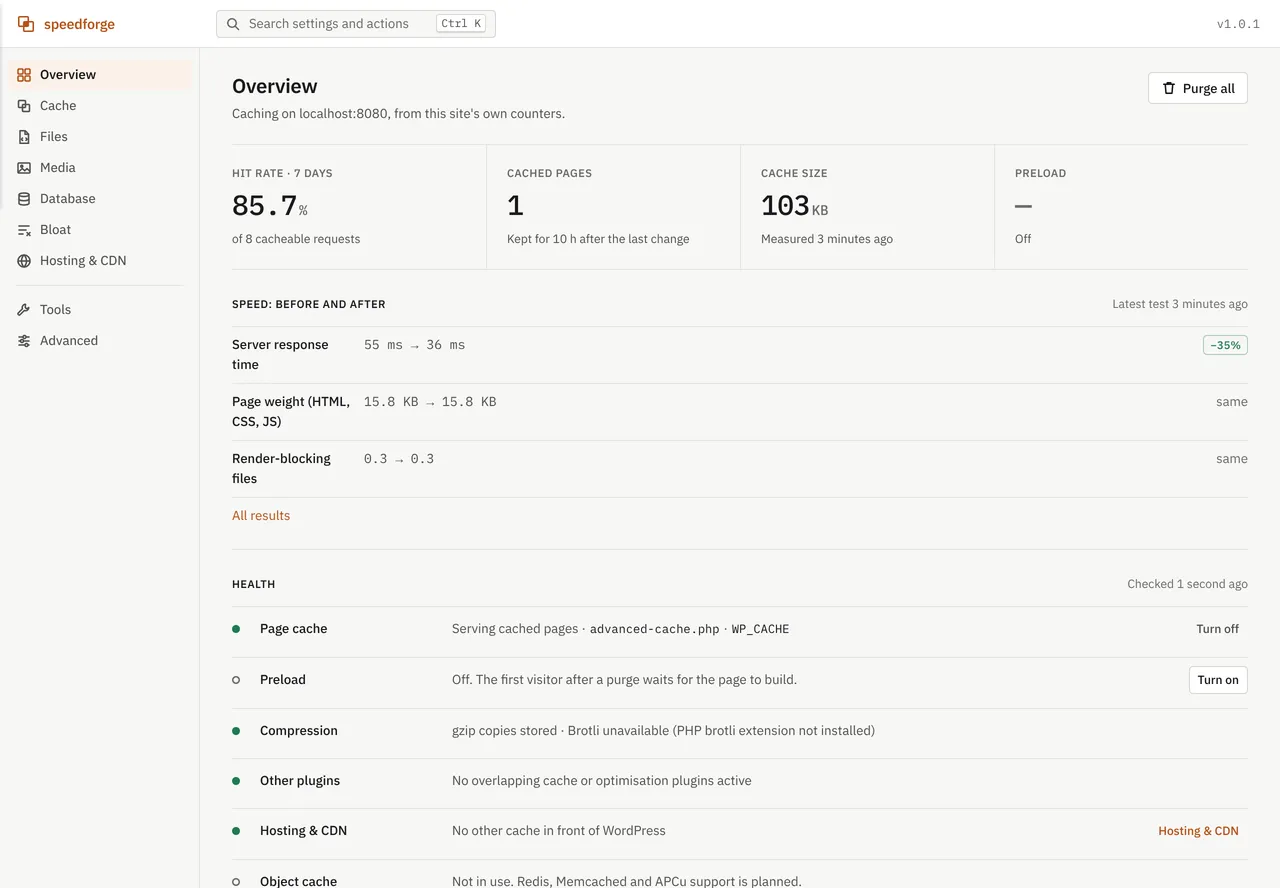
Overview
Page caching and optimisation with every change checked and undoable
SpeedForge is an all-in-one performance plugin for WordPress. At its core is a disk-based page cache that serves a stored copy of each page to visitors who are not logged in, before WordPress itself loads. Around it sit targeted purging, background preloading, an optional REST API cache for apps and headless front ends, CSS, JavaScript and HTML optimisation, lazy loading with WebP and AVIF images, a persistent object cache, database cleanup and a per-page Script Manager.
It is built for site owners, agencies and developers who want speed without guesswork. Every feature starts switched off, and each setting is labelled Safe, Moderate or Advanced. Every save is versioned, checked against your test pages and reverted automatically if one of them breaks. A before-and-after speed test, full WP-CLI coverage and settings export and import make it practical to run across many sites, including WooCommerce, Elementor and Paid Memberships Pro builds.
Automatic check and rollback
After every save, SpeedForge loads up to five test pages with and without its changes, compares them, and reverts any change that breaks a page.
A cache that knows what changed
Smart purging clears an edited post and the pages that list it, while background preloading and stale-while-rebuilding keep visitors on cached copies.
Works with your host and CDN
Detects Cloudflare, Kinsta, WP Engine, SiteGround, LiteSpeed, Varnish and many other layers, forwards purges to them, and can leave page caching to your host.
Features
Everything inside SpeedForge
A complete list of what the plugin does, grouped the way you will use it.
Page cache
A disk-based cache that answers most anonymous visits with a single stored file instead of PHP and database work.
Disk page cache. Stores a rendered copy of each page and serves it before WordPress loads.
Two-step cache decision. A page is stored only when a check before WordPress loads and a check after rendering both agree it is cacheable.
Serve stale while rebuilding. When a page expires, one visitor triggers the rebuild while others receive the previous copy, with a stale window of 1 to 1440 minutes (default 60).
Compressed copies. Keeps gzip copies, plus Brotli when the PHP brotli extension is installed, so pages are sent compressed with no extra CPU work.
Mobile and cookie variants. Optional separate copies for themes that send different HTML to phones, and one copy per value of chosen cookies such as a currency switcher.
Status header and hit counter. An optional X-SpeedForge header reports HIT, MISS, STALE or BYPASS, and a 7-day hit rate appears on the Overview.
Purging and preload
Precise purging keeps the cache fresh without throwing away pages that did not change.
Smart purge. Editing a post clears that post and the pages that list it, such as the home page, archives, categories, tags and parent pages, rather than the whole cache.
Purge from anywhere. Purge everything, a single URL or the current page from the admin bar, the Cache screen, the command palette or WP-CLI.
Background preload. Visits pages through WP-Cron so the first real visitor gets a cached copy, starting with the home page, then menus, then everything else.
Rebuild after purge. Purged pages can be queued for preloading straight away, with tunable batch time, pause between requests and a URL cap (default 5,000).
Query string control. Ignores 20 common tracking parameters such as utm tags, fbclid and gclid by default, while other parameters can be allowed their own cached copies.
REST API cache for apps and headless sites
Public REST reads are served from cache while every authenticated request still reaches WordPress.
Cached public reads. Anonymous GET requests to wp-json routes, by default the core wp/v2 routes, are served from cache along with their pagination headers.
Authenticated traffic always bypasses. Login cookies, Authorization headers, application passwords, nonces, API key headers, token parameters and WooCommerce cart tokens all go straight to WordPress.
Instant invalidation. Any content change, including custom fields, clears the REST cache, and a lifespan setting covers changes a purge cannot see.
CORS from cache. Cached copies answer cross-origin requests with WordPress's default CORS headers, and this behaviour can be turned off.
File optimisation
CSS, JavaScript and HTML optimisation that respects load order and steps aside where it would cause harm.
Minify HTML, CSS and JavaScript. Produces smaller local files and pages, leaves scripts, styles, pre blocks and form fields untouched in HTML, and only copies files that are already minified.
Combine CSS and JavaScript. Joins adjacent local files while keeping their order and media, and never joins files that use @import.
Defer JavaScript. Lets the page render before scripts run, respecting WordPress's own loading decisions, with jQuery excluded by default.
Delay third-party scripts. Analytics, pixels, chat and ad scripts, matched by 17 preset patterns, load on the first scroll, tap, click or keypress, with an optional timeout.
Move head scripts to the footer. Moves scripts out of the head while keeping their order.
Scope controls and safe mode. Logged-in users get unmodified pages by default, paths can be excluded, and a step that fails on a page is switched off for that page only.
Media
Image and embed handling that lightens pages without ever altering your original files.
Lazy loading. Images, iframes, videos and inline background images load as visitors scroll, with the first images (default 2) kept eager and exclusions by URL, class or ID.
Main image priority. Marks the first large image, usually the LCP element, as high priority and never lazy-loads it.
Missing image dimensions. Adds width and height to uploaded images that lack them, reducing layout shift.
YouTube and Vimeo placeholders. Shows a click-to-play preview so the player loads only when a visitor asks for it.
WebP and AVIF copies. Creates copies on your server with GD or Imagick, keeps them only when smaller, serves them through a picture element and converts existing images in bulk or new uploads in the background.
Upload limits. Sets WordPress's big-image threshold (default 2560 px) and the JPEG quality used for resized images (default 82).
Object cache and database
A persistent object cache and a database cleanup that shows its counts first and keeps a backup of every row it removes.
Persistent object cache. Supports Redis, Memcached or APCu, tests the connection before switching on, and during an outage lets WordPress carry on while retrying every 30 seconds.
Safe on shared servers. Clears only this site's keys, honours WP_REDIS constants and never replaces an object-cache.php that belongs to another plugin or your host.
Database cleanup with dry run. Ten cleanups, including old revisions, auto-drafts, trash, spam, orphaned meta, expired transients and the embed cache, show their counts before anything is deleted.
Undo for cleanups. Every deleted row is saved to a backup file first, the last five cleanups can be put back, and an optional weekly schedule is off by default.
Autoloaded options analysis. Lists the largest autoloaded options with their likely plugin and lets you stop autoloading one, reversibly, with WordPress's own options protected.
Tables. Shows overhead and optimises tables on MySQL and MariaDB, and lists tables left by other plugins without ever deleting them.
Bloat removal and Script Manager
Switch off what a page does not need, either across the site or one asset at a time.
WordPress features, one by one. Turn off the emoji script, extra head links, oEmbed discovery, Dashicons for visitors, jQuery Migrate, XML-RPC, RSS feeds and self-pingbacks individually.
Heartbeat control. Keep the WordPress default, slow it to every 60 seconds, turn it off on the site only, or allow it only in the post editor.
Revision limit. Set how many revisions WordPress keeps per post, with any value in wp-config.php taking precedence.
Script Manager. Scan any page as a visitor to list its scripts and stylesheets with size, origin and dependants, then switch one off on that page, on URL patterns or everywhere.
Hosting, CDN and browser caching
SpeedForge recognises the caching layers in front of your site and keeps them in step.
Host and CDN cache detection. Identifies Cloudflare including APO, Sucuri, Fastly, CloudFront, QUIC.cloud, Kinsta, WP Engine, SiteGround, Cloudways, Pantheon, Varnish, Nginx FastCGI cache and more, with evidence and advice for each.
Purge forwarding. Clears LiteSpeed, Varnish, Nginx, Kinsta, WP Engine, SiteGround and Cloudways caches whenever SpeedForge purges, even with its own page cache off.
Cloudflare API connection. An opt-in API token clears changed pages or everything on Cloudflare, and a one-click mode keeps optimisation while the host handles page caching.
CDN rewrite. Serves this site's static files from BunnyCDN, KeyCDN, CloudFront or any pull CDN by file type and folder, while JavaScript modules stay local so import maps keep working.
Browser caching and compression rules. Long-lived caching for static files, gzip or Brotli for text, font CORS, consistent ETags and HTML revalidation, written to .htaccess only after you review and apply.
Optional security headers. Nosniff, referrer policy, frame protection and HSTS, each off by default with a note on what it can affect.
Speed test, safety net and admin tools
Measure the difference, keep every change reversible, and find any setting in seconds.
Before and after speed test. Measures up to five test pages without SpeedForge and as visitors get them now, covering response time, page weight, requests and render-blocking files, with optional PageSpeed Insights scores.
Automatic check and rollback. After each save the test pages are compared with and without SpeedForge on status, errors, title and visible text, and a breaking change is reverted at once.
Settings versions. The last 20 changes are kept with what changed, and you can restore any version or return to the last known good one.
Presets. Safe, Balanced and Fastest presets are applied as normal saves, so they are checked and undoable like any other change.
Export and import. Moves all settings and Script Manager rules between sites as JSON, without passwords or tokens.
Admin experience. A single-page admin with a Ctrl or Cmd+K command palette, light and dark themes, risk labels, an activity log and two Site Health tests.
Safety and recovery
Built so you can always get back
How SpeedForge protects your site while it works, and what to do if you ever need to switch it off.
Emergency off switches
Add define( 'SPEEDFORGE_DISABLE', true ); to wp-config.php and the plugin does not boot at all. To stop only the page cache, delete wp-content/advanced-cache.php; to stop only the object cache, define SPEEDFORGE_OBJECT_CACHE_DISABLE as true or delete wp-content/object-cache.php.
Turn all speed features off
The Turn all speed features off button on the Tools screen, or wp speedforge pause, switches off caching, preload, browser rules, headers and file optimisation and deletes cached pages, while your settings stay in the history.
Undo and settings versions
Every save toast has an Undo button, also available as wp speedforge settings undo. The last 20 versions can be restored from Tools or with wp speedforge settings history and wp speedforge settings restore <version>.
Automatic check and rollback
The safety.auto_check and safety.auto_rollback settings are on by default. Run a manual check with the Check site now button or wp speedforge check. If loopback requests are blocked, nothing is reverted.
Per-page safe mode
An optimisation step that fails on a URL is switched off for that URL only and listed with a Try again button. Manage the list with wp speedforge safe-mode list or wp speedforge safe-mode clear.
Protected server files
SpeedForge writes only between the # BEGIN SpeedForge and # END SpeedForge markers in .htaccess, saves a backup first and restores it if the home page or a static file returns a server error. wp-config.php is backed up before the WP_CACHE line is added.
Database and media undo
Undo any of the last five cleanups with wp speedforge db undo or the Undo a cleanup list. Remove converted copies, or wp speedforge optimize-images --restore, deletes only SpeedForge's WebP and AVIF files.
Screenshots
SpeedForge, screen by screen
Real screens from the plugin running on a WordPress site. Select a screen to read about it, or click the image to view it full size.
Pricing
Choose your SpeedForge licence
Secure payment through Razorpay. Your licence key and download link are emailed as soon as the payment is confirmed.
Single Site
For one live website you own or manage.
₹16,999
Price in Indian rupees
- Licence for one website
- Licence key and download by email
- Plugin updates for your licence
- Help by email
Unlimited Sites
For agencies and owners of several websites.
₹32,999
Price in Indian rupees
- Licence for every website you run
- Licence key and download by email
- Plugin updates for your licence
- Help by email
- Ideal for agencies and client sites
Compatibility
Requirements and integrations
- WordPress
- 6.0 or later
- Tested up to
- WordPress 7.1
- PHP
- 7.4 or later
- Also needs
- WP-Cron, or a system cron if WP-Cron is disabled, for preloading
- Optional: PHP Redis, Memcached or APCu for the persistent object cache
- Optional: GD or Imagick with WebP or AVIF support for image conversion
- Optional: the PHP brotli extension for Brotli copies and zlib for gzip copies
Works with
- WooCommerce: cart, checkout and account pages are never cached, shoppers with items in the cart bypass the cache, and products are purged on stock changes.
- Elementor: the editor, preview and template library are never cached or optimised, Elementor's scripts are never delayed or combined, and regenerating files purges the cache.
- Paid Memberships Pro: membership pages are never cached, checkout and billing are never optimised, and payment and captcha scripts are never delayed.
- Easy Digital Downloads: visitors with EDD cart cookies bypass the cache.
- Web servers: Apache and LiteSpeed through .htaccess, with ready-to-copy snippets for Nginx and IIS.
- CDNs: Cloudflare with API purge and APO awareness, BunnyCDN, KeyCDN, CloudFront or any pull CDN.
- Warns about 16 overlapping performance plugins, including WP Rocket, W3 Total Cache, LiteSpeed Cache and Autoptimize, and never overwrites their cache drop-ins.
- Table optimisation on MySQL and MariaDB, with SQLite sites recognised.
Good to know
- Does not use an external image or CSS service; WebP and AVIF conversion needs GD or Imagick with that support on your server.
- Does not generate critical CSS, remove unused CSS or optimise fonts.
- Does not edit Nginx or IIS configuration; it provides snippets for you to copy.
- Does not cache logged-in users, POST requests, the admin, search results, previews or password-protected posts, and skips 404 pages unless you enable them.
- Does not check pages beyond your test pages (up to five), and cannot run its safety check when the server blocks loopback requests.
- Does not provide an object cache server; Redis, Memcached or APCu must be available from your host.
Changelog
What has changed
Current version: 1.0.0.
Version 1.0.1
- Paid Memberships Pro: membership pages are never cached, checkout and billing are never optimised, Stripe, PayPal, Braintree and captcha scripts are never delayed, and level changes rebuild cached pages.
- Apps: REST requests authenticated by JWT or application passwords are recognised even when Apache or LiteSpeed hide the Authorization header, and API key and token parameters always bypass the REST cache.
- PMPro per-member routes and me routes are never cached.
- Fix: the cached pages list did not load on sites with plain permalinks.
- Fix: uninstalling ended with a PHP error after the files were removed.
Version 1.0.0
- Bloat removal: emoji script, head links, oEmbed discovery, Dashicons for visitors, jQuery Migrate, XML-RPC, RSS feeds, self-pingbacks, Heartbeat frequency and revision limit, each as its own setting.
- Script Manager: scan any page to list its scripts and stylesheets and switch one off on that page or everywhere, with rules restored by the safety check if a page breaks.
- CDN: rewrite static file URLs to a pull CDN, with JavaScript modules kept on the site so import maps keep working.
- Advanced screen: Safe, Balanced and Fastest presets, settings export and import without passwords or tokens, an activity log with filters, and reset.
- Site Health: page cache and safe mode tests.
Version 0.8.0
- Object cache: Redis, Memcached or APCu, tested before it is switched on, with automatic retries during an outage and only this site's keys cleared.
- Database cleanup with dry-run counts, a backup of every deleted row and undo for the last five cleanups, plus an optional weekly schedule.
- Autoloaded options analysis and table optimisation on MySQL and MariaDB.
- WP-CLI: db and object-cache commands.
Version 0.7.0
- Media: lazy loading, main image priority, missing width and height, and YouTube and Vimeo click-to-play placeholders.
- WebP and AVIF copies created with GD or Imagick, kept only when smaller, with originals never changed.
- Upload limits for WordPress's big-image threshold and JPEG quality.
- Elementor: editor and preview never cached or optimised, and template, kit and Performance setting changes purge the cache.
Version 0.6.0
- Hosting and CDN: detects Cloudflare, Hostinger, LiteSpeed, Varnish, Nginx, Kinsta, WP Engine, SiteGround, Cloudways and other caches, forwards purges to them and connects to Cloudflare's API on request.
Version 0.5.0
- Speed test comparing each test page without SpeedForge and as visitors get it now, with optional Google PageSpeed Insights.
- Safety net: a change that breaks a test page is undone automatically, earlier settings versions can be restored, and every speed feature can be turned off at once.
- WP-CLI: speed-test, check, pause, settings history and settings restore.
Version 0.4.0
- REST API cache for apps and headless front ends.
- Fix: settings changed from WP-CLI could take up to two seconds to reach the web server.
- Fix: cached responses sent only the last Vary header.
Version 0.3.0
- HTML, CSS and JavaScript minification, combining, defer, delay of third-party scripts, moving scripts to the footer, and safe mode with per-page automatic disabling.
Version 0.2.0
- Browser caching and compression rules with .htaccess backup and rollback, Nginx and IIS snippets, optional security headers and HTML revalidation.
Version 0.1.0
- Page cache, smart purge, preload, WooCommerce compatibility and WP-CLI.
Documentation
Getting started with SpeedForge
Installation
- 1Check that the server runs PHP 7.4 or later and WordPress 6.0 or later.
- 2Go to Plugins, Add New, Upload Plugin, choose the SpeedForge zip, click Install Now and then Activate. Alternatively, copy the speedforge folder into wp-content/plugins and activate it.
- 3Open the new SpeedForge menu, or the Settings link on the Plugins screen. Nothing is switched on yet.
- 4If another caching plugin is active, turn off its page cache first, because SpeedForge will not replace another plugin's advanced-cache.php.
First-time setup
- 1On the Overview, review the Health list for overlapping plugins, compression, hosting and WP-Cron.
- 2Open Hosting and CDN to see what already sits in front of the site. If your host caches pages, choose Use the host's cache; if Cloudflare caches pages, add an API token and click Connect and test.
- 3On Tools, optionally set up to five test pages, then click Run speed test to record a baseline.
- 4Under Advanced, Presets, apply Safe, or turn on the page cache from the Overview. Confirm the wp-config.php change in the dialog, or add define( 'WP_CACHE', true ); by hand if the file is not writable.
- 5Under Cache, Preload, turn on preloading so pages are cached before visitors arrive.
- 6Under Cache, Browser and headers, turn on browser caching, then review and apply the .htaccess rules, or copy the Nginx or IIS snippet.
- 7Work through Files, Media, Bloat and Database one change at a time. Each save is checked automatically and can be undone from its notification.
- 8Run the speed test on Tools again to compare before and after.
WP-CLI commands
wp speedforge status [--format=table|json]
wp speedforge enable
wp speedforge disable
wp speedforge purge --all | --url=<url> | --post=<id>
wp speedforge preload [--queue] [--run] [--clear] [--budget=<seconds>]
wp speedforge settings list | get <key> | set <key> <value> | undo | reset | history | restore <version>
wp speedforge server-rules [status | show --server=apache|nginx|iis | apply | remove]
wp speedforge safe-mode [list | clear] [--feature=<feature>] [--path=<path>]
wp speedforge speed-test [--urls=<urls>] [--format=table|json]
wp speedforge check
wp speedforge pause
wp speedforge optimize-images [--limit=<n>] [--restore]
wp speedforge db status | clean [<cleanup>...] [--yes] | undo [<id>] | backups | optimize
wp speedforge object-cache status | flush | enable | disable
FAQ
Questions about SpeedForge
Something else on your mind? Write to us before you buy.
Will SpeedForge break my site?
Every feature is off until you turn it on. After each change SpeedForge loads your test pages with and without itself and undoes the change automatically if a page broke, and any earlier settings version can be restored.
What if something goes wrong and I cannot reach the admin?
Add define( 'SPEEDFORGE_DISABLE', true ); to wp-config.php, or delete wp-content/advanced-cache.php, and caching stops immediately. With WP-CLI access, wp speedforge pause switches every speed feature off.
Does it work with WooCommerce?
Yes. Cart, checkout and account pages are never cached, shoppers with items in their cart always see live pages, and products are purged when their stock changes.
My host already caches pages. Do I still need it?
SpeedForge detects host and CDN caches and explains how they fit together. It can leave page caching to your host while handling optimisation, and it clears the host's cache whenever your content changes.
Does it change my original images?
No. WebP and AVIF copies are stored next to the originals, kept only when they are smaller, and can all be removed with one button.
Can I undo a database cleanup?
Yes. Every deleted row is saved to a backup file before it is removed, and any of the last five cleanups can be undone.
Does it send my data anywhere?
No external requests are made unless you turn on Cloudflare purging or Google PageSpeed Insights. Settings exports never include passwords or tokens.
Can I manage it across many sites?
Yes. Every major action has a WP-CLI command, and settings together with Script Manager rules can be exported from one site and imported on another.