UMM SEO
SEO plugin for WordPress
Run your whole SEO workflow inside WordPress
UMM SEO brings on-page metadata, technical SEO, schema, redirects, internal linking and Search Console data into one admin, with deterministic checks you can read, tune and rely on.
- Version
- 1.0.1
- WordPress
- 6.2 or later
- PHP
- 8.1 or later
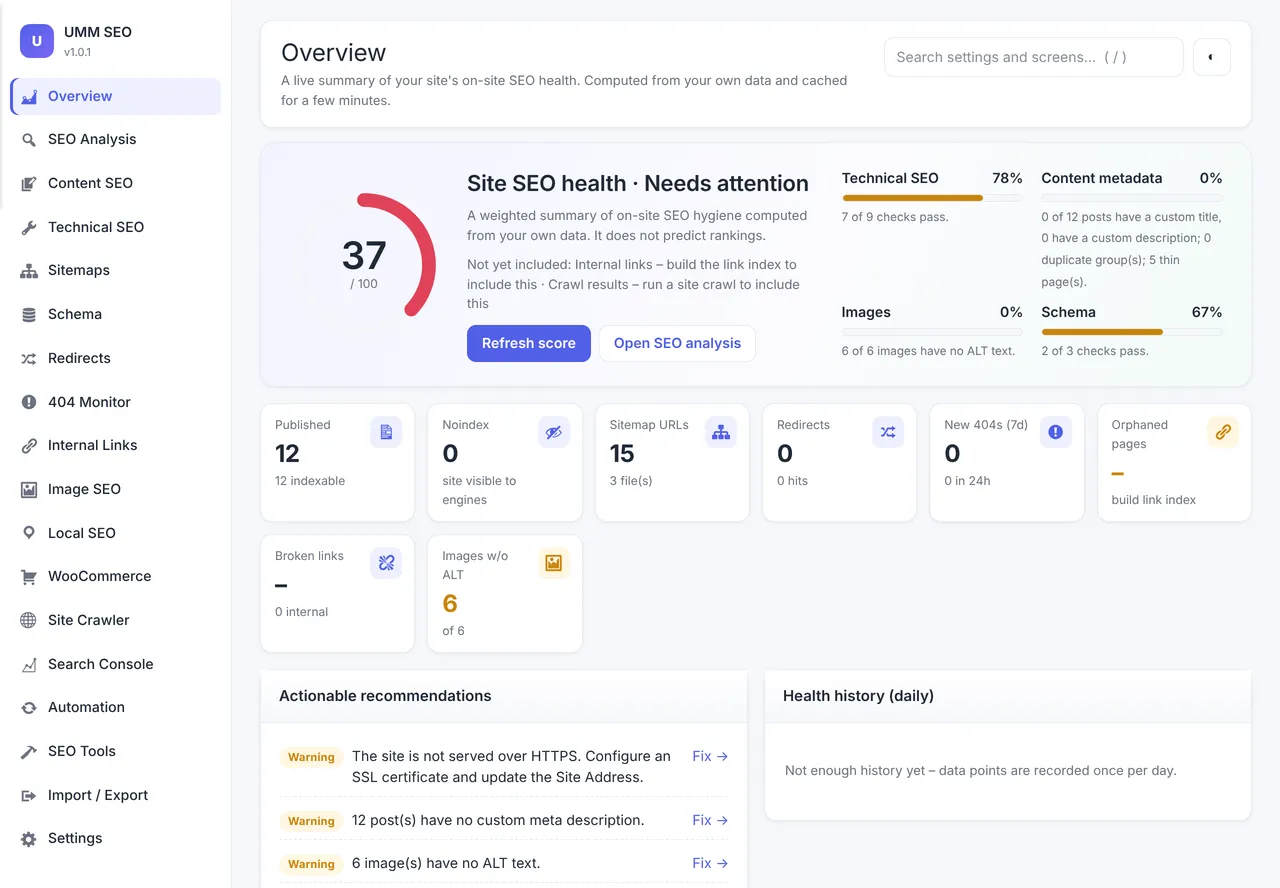
Overview
The complete SEO workflow in WordPress, built on transparent rules
UMM SEO is an all-in-one SEO plugin for WordPress covering on-page metadata, rule-based content analysis, XML sitemaps, robots.txt, JSON-LD schema, redirects and a 404 monitor, internal linking, image SEO, Local SEO, WooCommerce SEO, a built-in site crawler and Google Search Console reporting. It runs as 20 modules behind a single UMM SEO menu with 18 screens, plus an SEO panel in the block editor, a classic editor meta box, Elementor page settings and fields on taxonomy terms.
It is aimed at site owners, agencies and in-house marketers who want the full SEO workflow inside WordPress, and at teams moving away from Yoast SEO, Rank Math, All in One SEO or SEOPress. Its approach rests on transparency and safety: every suggestion is a deterministic rule, the health score shows its weights, nothing contacts outside services on normal page loads, and changes are logged with before and after values so they can be rolled back.
Transparent by design
Every suggestion comes from a deterministic rule, the health score shows its weights, and nothing contacts outside services on normal page loads.
Diagnostics most plugins skip
A conflict detector shows which plugin or theme wrote each head tag, and a daily regression monitor reports title, robots, canonical or schema changes that editing did not cause.
Switch without losing data
Migrate from Yoast SEO, Rank Math, All in One SEO or SEOPress with a preview and a full backup first. The source plugin's data is never deleted.
Features
Everything inside UMM SEO
A complete list of what the plugin does, grouped the way you will use it.
Meta, titles and social
Control how every page appears in search results and when it is shared.
Title and description templates. Set templates per content type, taxonomy and archive using 18 variables such as %title%, %sitename%, %sep%, %category% and %focuskw%.
Per-post and per-term overrides. Override the SEO title, meta description, canonical, robots index and follow, advanced directives and snippet and preview limits for any post or term.
Automatic descriptions. Builds a missing description from the excerpt or first paragraph, at 155 characters by default and configurable between 70 and 320.
Open Graph and X cards. Custom social title, description and image, card type and a default social image, with image selection that skips decorative and tiny images.
Live previews. Desktop and mobile search previews, plus share previews for Facebook, X, LinkedIn, WhatsApp, Slack and Google with length and image-size checks.
Bulk editor. Edit SEO titles, descriptions, focus keywords, canonicals and robots settings 20 posts at a time, filtered by type or by missing field.
Content analysis and keywords
Configurable, rule-based checks for individual pages and for the site as a whole.
31 rule-based checks. Grouped into SEO, content, links and readability, covering keyword placement and density, lengths, duplicates, thin content, headings, image alt text, links, freshness and an approximate Flesch reading ease.
Configurable rules. Switch any check off and edit every threshold, including title and description length, word counts, keyword density, sentence and paragraph length and freshness.
Site audit. Lists posts missing an SEO title, description or focus keyword, duplicate titles and descriptions, and thin pages.
Content decay. Lists pages that have not been updated for longer than the freshness threshold, which defaults to 12 months.
Keyword groups and cannibalisation. Define keyword groups with search intent and one target page each, and see focus keywords or Search Console queries where several of your pages compete.
Duplicate content finder. Finds pages with exact or 80 percent and higher similar content.
Sitemaps and indexing
Clean sitemaps and precise indexing rules, with your robots.txt edited and validated in place.
XML sitemaps. An index at /sitemap_index.xml with post type, taxonomy, author, local and news sitemaps including image and video entries, and the core WordPress sitemap redirected to it.
Exclusions and per-type controls. Noindexed and canonicalised-elsewhere content is left out automatically, with manual exclusion by post ID, path or term ID and per-type include and exclude.
IndexNow and Google submission. Optionally queue changed URLs for IndexNow (Bing, Yandex, Naver and Seznam) and submit sitemaps to Google through the Search Console API.
Indexing rules. Noindex search results, date archives, paginated archives, empty terms or whole post types and taxonomies, control author archives and redirect attachment pages to their parent.
Virtual robots.txt editor. A validator with line-level messages, a live preview of what crawlers receive, physical file detection and a sitemap consistency check.
Technical SEO
Tools for the details that quietly decide how search engines read your site.
URL normalisation and headers. Trailing slash enforcement, www or non-www redirects, the X-Robots-Tag header, custom response headers with dangerous headers rejected, and spam-search blocking with a 410.
Head cleanup and hreflang. Remove shortlink, generator and RSD tags, add hreflang alternates with an optional x-default, and optionally output rel prev and next.
Canonical audit. Finds canonical conflicts with a bulk reset to self-referential, and detects the same slug used across post types.
Indexability consistency checker. Compares HTTP status, robots meta, robots.txt, canonical and sitemap membership for a single URL or for sitemap samples of 20.
URL change impact and database cleanup. The SEO Tools screen adds a URL change impact analyser and a database cleanup tool alongside the change history and backups.
Schema
A connected JSON-LD graph with templates, validation and a visual map.
28 schema types. Includes Organization, LocalBusiness, Person, WebSite, WebPage, Article, Product, ProductGroup, Review, BreadcrumbList, FAQPage, HowTo, Recipe, Event, Course, VideoObject, JobPosting, Service and more.
Connected graph. Site entity, website, page and article nodes are linked by @id, with per-page type overrides and custom JSON-LD.
Conditional templates. Reusable entities applied by post type or term, using variables such as %title%, %url% and %image%.
Validator and graph visualiser. Checks required and recommended properties, flags duplicates and unresolved references, labels Google rich-result status per type and draws the graph.
Breadcrumbs. BreadcrumbList output plus visible breadcrumbs through the [umm_breadcrumbs] shortcode or the umm_seo_breadcrumbs() function.
Redirects and 404s
A redirect manager that catches problems before they reach visitors.
Redirect manager. Supports 301, 302, 303, 307, 308, 410 and 451 responses with exact, prefix and regex matching, groups, hit counts and bulk actions.
Chain and loop detection. Lists multi-hop chains and loops with a suggested fix for each.
URL change suggestions. When a published URL changes, the old address is queued for a one-click 301, with automatic creation available as an opt-in setting.
CSV import and export. Up to 5,000 rows or 2 MB per file, dry run by default, with each row validated like a manual rule.
404 monitor. Logs missing URLs, referrers and hit counts without storing IP addresses, suggests similar existing pages and creates a redirect in one step.
Internal links
A local link index that shows how your pages connect and where they should.
Link index. A local table of internal and external links per page, built in batches and updated whenever a post is saved.
Orphan, weak and overlinked pages. Configurable thresholds, with menu links counted as inbound links.
Approved-only suggestions. Finds focus keywords, extra keywords and titles in plain text in both directions, inserts nothing until you tick and apply, and lets you roll insertions back.
Broken link checker. Checks internal links in batches of 25, with external links checked only when you enable it.
Anchor text and link equity. Flags empty or generic anchors and shows a 0 to 100 model of how link equity flows through your own structure, with click depth.
Images, Local SEO and WooCommerce
Dedicated tools for image libraries, physical locations and online shops.
Image audit. Flags missing or filename-like ALT text, missing titles, non-descriptive filenames, large files and oversized or tiny dimensions, with a bulk ALT editor and a fill action that never overwrites existing ALT text.
Local SEO. Multiple locations with business type, address, geo, phone, opening hours, service areas and landing page, plus LocalBusiness schema, a local sitemap and address and hours shortcodes.
WooCommerce schema. Product and ProductGroup markup with price, currency, availability, SKU, GTIN, brand and images, using ratings only from approved customer reviews.
WooCommerce indexing. Noindex cart, checkout and account pages, noindex and canonicalise filtered or sorted listing URLs, keep or noindex out-of-stock products, and report product images without ALT text.
Crawler, Search Console and monitoring
See your site the way search engines do, and know when something changes.
Site crawler. Crawls your own host only, respects robots.txt and Crawl-delay, handles up to 10,000 URLs in rate-limited batches and reports 26 issue types and crawl-budget signals.
Search Console reports. Clicks, impressions, CTR and position with period comparison, top queries and pages, countries, devices and position 8 to 20 opportunities, synced daily and stored locally.
Conflict detector. Fetches your own pages, lists which plugin or theme wrote each head tag, flags duplicate tags and lists every wp_head callback.
Regression monitor. Takes a daily snapshot of each URL's title, description, robots, canonical and schema, and reports changes not caused by editing the page with a likely cause.
Daily detections and weekly report. Watches for new 404s, broken links, new noindex pages, sitemap changes and missing or duplicate metadata, with an optional e-mailed weekly report.
Rule-based auto-fill. An opt-in tool that previews proposed titles and descriptions for posts missing them and applies them only on confirmation, after a backup.
Safety and recovery
Built so you can always get back
How UMM SEO protects your site while it works, and what to do if you ever need to switch it off.
Migration that never deletes source data
The migration assistant imports from Yoast SEO, Rank Math, All in One SEO and SEOPress, previews counts and samples, takes a full backup first, skips unsafe redirects and never overwrites existing values unless you tick Overwrite.
Never deactivates other plugins
UMM SEO detects 11 other SEO plugins and shows a warning on its screens, leaving the decision to deactivate them with you.
Change history with rollback
Before and after values are logged for metadata, settings, ALT text, inserted links and redirects, and each change can be rolled back from SEO Tools.
Automatic backups
Backups are taken before bulk edits, CSV imports and migrations, a weekly automatic backup is on by default, and restores can be selective.
Redirect safety
External redirect targets must be allow-listed, wp-admin and wp-login cannot be redirected, and regular expressions prone to ReDoS are refused.
Module manager
Non-core modules can be switched off, and are then not loaded at all.
Data kept on uninstall
All data stays unless Delete ALL plugin data is enabled, and SEO fields are stored as standard post and term meta with the _umm_seo_ prefix.
Screenshots
UMM SEO, screen by screen
Real screens from the plugin running on a WordPress site. Select a screen to read about it, or click the image to view it full size.
Pricing
Choose your UMM SEO licence
Secure payment through Razorpay. Your licence key and download link are emailed as soon as the payment is confirmed.
Single Site
For one live website you own or manage.
₹10,999
Price in Indian rupees
- Licence for one website
- Licence key and download by email
- Plugin updates for your licence
- Help by email
Unlimited Sites
For agencies and owners of several websites.
₹23,999
Price in Indian rupees
- Licence for every website you run
- Licence key and download by email
- Plugin updates for your licence
- Help by email
- Ideal for agencies and client sites
Compatibility
Requirements and integrations
- WordPress
- 6.2 or later
- Tested up to
- WordPress 7.1
- PHP
- 8.1 or later
- Also needs
- PHP sodium functions for token encryption
- WP-Cron, or a system cron calling wp-cron.php, for scheduled jobs
- Optional: your own Google Cloud OAuth client for Search Console and GA4
- Optional: WooCommerce for product schema and the WooCommerce screen
Works with
- Block editor: a UMM SEO sidebar with SEO, Social, Advanced and Schema tabs and live analysis.
- Classic editor: a UMM SEO meta box with search and social previews and live analysis.
- Elementor: focus keyword, SEO title, meta description and noindex fields in page settings, synced with UMM SEO, with widget CSS and JavaScript kept out of descriptions and analysis.
- WooCommerce: declares HPOS and Cart and Checkout Blocks compatibility, with a configurable brand taxonomy.
- Imports data from Yoast SEO, Rank Math, All in One SEO and SEOPress, including from plugins that are deactivated but not deleted.
- REST API: a public meta endpoint for published content and an umm_seo field on core post and term endpoints.
- Developer filters and actions, including umm_seo_head_tags, umm_seo_schema_graph and umm_seo_capability.
- Translation ready, with all CSS and JavaScript bundled locally and no CDNs or remote fonts.
Good to know
- Does not include AI writing or AI-generated suggestions; every check and suggestion is a deterministic rule.
- Does not predict rankings; scores are best-practice checklists, and Flesch reading ease is an English-language approximation.
- Does not show Google data until you create and authorise your own Google Cloud OAuth client.
- Does not offer role-based access settings; admin screens require manage_options and editors use the per-post panel.
- Does not rename or compress image files.
- Does not yet have reported test coverage beyond PHP 8.3 and WordPress 7.1 on SQLite; MySQL, MariaDB, Nginx, caching plugins and multisite network activation have not been exercised.
Changelog
What has changed
Current version: 1.0.1.
Version 1.0.1
- Fixed: style, script, svg and similar blocks in Elementor HTML and text widgets no longer appear as text in automatic descriptions, search previews or analysis, and builder pages use only Elementor data.
- Fixed: social image selection skips decorative and tiny images, falling back to the first real content image, then the default image, then the site icon.
- Fixed: toggle switches showed stray checkbox dots on settings screens.
- Fixed: the block editor sidebar overflowed horizontally.
- Changed: the editor Social tab shows per-platform previews for Facebook, X, LinkedIn, WhatsApp, Slack and Google with length and image-size checks, and the classic meta box gains a share preview.
- Changed: the admin defaults to a lighter theme, with dark mode available from the toggle.
- Changed: a redesigned Overview dashboard with a health banner, stat tiles and an all-tools grid.
Version 1.0.0
- Metadata engine with templates and variables, per-post and per-term overrides, robots directives, canonicals, Open Graph, X cards and rule-based automatic descriptions.
- Rule-based analysis engine with 30 or more configurable checks, a block editor sidebar, classic meta box, Elementor page settings and term fields.
- XML sitemaps for post types, taxonomies, authors, local, news, image and video, with exclusions and opt-in IndexNow.
- Virtual robots.txt editor with a standards-based validator, plus indexing, archive, attachment, header, hreflang and URL normalisation controls.
- Schema with 28 types, a connected graph, conditional templates, a validator, a graph visualiser and import and export.
- Redirects with 7 status codes, chain and loop detection, CSV transfer, a 404 monitor and URL change suggestions.
- Internal link index, orphan detection, approved link suggestions, a broken link checker, a link equity model and click depth.
- Image SEO audits, Local SEO for multiple locations and WooCommerce SEO.
- Site crawler with crawl-budget diagnostics, Search Console with your own OAuth client, and optional GA4.
- Automation, an activity log with rollback, backups and restore, and migration from Yoast, Rank Math, AIOSEO and SEOPress.
- Diagnostics including a conflict detector, ownership inspector, indexability checks, regression monitor, canonical audit and duplicate content finder.
- An 18-section admin with light and dark modes, global settings search, a REST API and a WP-CLI migration command.
Documentation
Getting started with UMM SEO
Installation
- 1Check that the site runs PHP 8.1 or later and WordPress 6.2 or later.
- 2Go to Plugins, Add New, Upload Plugin, choose the UMM SEO zip and activate it.
- 3Open UMM SEO in the admin menu and review the Overview health score and recommendations.
Switching from another SEO plugin
- 1Go to Import and Export, Migration assistant, and review the counts and preview.
- 2Choose what to import and click Migrate. A full backup is taken first, and the source data is left untouched.
- 3Check your pages, then run the conflict scan under Technical SEO, Diagnostics.
- 4Deactivate the old plugin yourself once you are satisfied.
First-time setup
- 1Under Settings, Modules, switch off any features you do not need.
- 2Under Content SEO, set Templates for each content type, then Defaults and social for the homepage title and description, separator, default social image and X username.
- 3Under Schema, Site defaults, choose organisation or person and add the name, logo, contact details, profile URLs and breadcrumbs.
- 4Under Technical SEO, review Indexing and URLs and the Robots.txt editor, deleting any physical robots.txt file if it is flagged.
- 5Under Sitemaps, open /sitemap_index.xml, adjust content types and exclusions, and optionally enable IndexNow.
- 6Build your data: click Build index under Internal Links, Start crawl under Site Crawler, and review ALT findings under Image SEO.
- 7Set up any optional integrations, such as Local SEO locations, WooCommerce settings and the Search Console connection.
Ongoing use
- 1Under Automation, configure detections, the weekly report and e-mail delivery.
- 2Under SEO Tools, Backup and restore, create a first backup. The weekly automatic backup is on by default.
- 3On each page, use the UMM SEO sidebar in the block editor, the meta box in the classic editor or the Elementor page settings for keyword, title and description.
- 4If DISABLE_WP_CRON is set, call wp-cron.php from a system cron so scheduled jobs run.
WP-CLI commands
wp umm-seo migrate <yoast|rankmath|aioseo|seopress> [--overwrite]FAQ
Questions about UMM SEO
Something else on your mind? Write to us before you buy.
Does UMM SEO use AI?
No. Analysis, ALT text suggestions, automatic descriptions and link suggestions all come from deterministic rules, and the analysis checks and their thresholds can be configured.
Can I move over from Yoast, Rank Math, AIOSEO or SEOPress?
Yes. The migration assistant under Import and Export previews what will be copied, takes a backup and never deletes the old plugin's data. You deactivate the old plugin yourself when you are ready.
Will it deactivate my current SEO plugin?
No. It shows a warning, and the Diagnostics tab under Technical SEO shows which plugin writes each tag so you can resolve overlaps.
Does it slow down my site?
The crawler, analysis, reports and external calls never run on page views, and disabled modules are not loaded. On the authors' test site the plugin added no database queries to a page view when no redirects were configured.
How does the Search Console connection work?
You create an OAuth web application client in Google Cloud, paste its ID and secret, and connect. Tokens are encrypted, and data syncs daily and is stored on your site, with up to 16 months of backfill.
Can I undo changes?
Yes. The change history in SEO Tools rolls back metadata, settings, ALT text, inserted links and redirects, and backups can be restored selectively.
What happens to my data if I delete the plugin?
It stays in place unless you enable Delete ALL plugin data under Settings, Data and uninstall.
Why are my robots.txt changes not showing?
A physical robots.txt file on the server overrides the virtual editor. UMM SEO detects and flags it, and your edits take effect once that file is deleted.